

2025-06-27
Discovering DuckDB Use Cases via GitHub
Petrica Leuca
Introduction
One of the persistent challenges of maintaining an open-source library is the lack of visibility into how, where, and by whom it’s being used. At DuckDB we look at the awesome-duckdb repository, which contains a curated list of DuckDB libraries, tools and resources. To supplement this, we wanted to automate insights from GitHub in order to uncover new and emerging projects using DuckDB. In this post we write about how we use DuckDB to query the GitHub API, export the data into a Markdown file and visualize the historical data, generated from Git commits.
Data Retrieval from GitHub
GitHub provides a series of REST API which can be used to retrieve data from GitHub. Among them, the search repositories API returns a list of public repositories whose name, description or readme matches the search text.
GitHub also has a search code API in order to match on code dependency, but it does not return all the information the search repository provides. One could use the search code API and for each result to retrieve the repository information from the repository API.
In order to use the GitHub API, we create an access token with read access on public repositories. With the access token, saved as an environment variable, we create a secret in DuckDB to be used by the API request:
import os
import duckdb

def get_duckdb_conn():    conn = duckdb.connect()    conn.sql(f"""        CREATE SECRET http_auth (            TYPE http,            BEARER_TOKEN '{os.getenv("READ_PUBLIC_REPO_TOKEN")}',            SCOPE 'https://api.github.com/search'        );    """)    return conn
With the DuckDB Python client’s read_json function we are able to query the API response with SQL. The above secret is passed automatically by DuckDB to the API call:
duckdb_conn = get_duckdb_conn()
api_response = duckdb_conn.read_json(    "https://api.github.com/search/repositories?q=duckdb")
The API call returns the following response:
┌─────────────┬────────────────────┬──────────────────────────────────────┐│ total_count │ incomplete_results │ items ││ int64 │ boolean │ struct(id bigint, node_id varchar,...│├─────────────┼────────────────────┼──────────────────────────────────────┤│ 3837 │ false │ [{'id': 138754790, 'node_id': ... │└─────────────┴────────────────────┴──────────────────────────────────────┘We can analyze the response by:
-
getting the list of columns with
api_response.columns:['total_count', 'incomplete_results', 'items'] -
getting the column types
api_response.types:[BIGINT,BOOLEAN,STRUCT(id BIGINT, node_id VARCHAR, "name" VARCHAR, full_name VARCHAR, private BOOLEAN, "owner" STRUCT(login VARCHAR, id BIGINT, node_id VARCHAR, avatar_url VARCHAR, gravatar_id VARCHAR, url VARCHAR, html_url VARCHAR, followers_url VARCHAR, following_url VARCHAR, gists_url VARCHAR, starred_url VARCHAR, subscriptions_url VARCHAR, organizations_url VARCHAR, repos_url VARCHAR, events_url VARCHAR, received_events_url VARCHAR, "type" VARCHAR, user_view_type VARCHAR, site_admin BOOLEAN), html_url VARCHAR, description VARCHAR, fork BOOLEAN, url VARCHAR, forks_url VARCHAR, keys_url VARCHAR, collaborators_url VARCHAR, teams_url VARCHAR, hooks_url VARCHAR, issue_events_url VARCHAR, events_url VARCHAR, assignees_url VARCHAR, branches_url VARCHAR, tags_url VARCHAR, blobs_url VARCHAR, git_tags_url VARCHAR, git_refs_url VARCHAR, trees_url VARCHAR, statuses_url VARCHAR, languages_url VARCHAR, stargazers_url VARCHAR, contributors_url VARCHAR, subscribers_url VARCHAR, subscription_url VARCHAR, commits_url VARCHAR, git_commits_url VARCHAR, comments_url VARCHAR, issue_comment_url VARCHAR, contents_url VARCHAR, compare_url VARCHAR, merges_url VARCHAR, archive_url VARCHAR, downloads_url VARCHAR, issues_url VARCHAR, pulls_url VARCHAR, milestones_url VARCHAR, notifications_url VARCHAR, labels_url VARCHAR, releases_url VARCHAR, deployments_url VARCHAR, created_at TIMESTAMP, updated_at TIMESTAMP, pushed_at TIMESTAMP, git_url VARCHAR, ssh_url VARCHAR, clone_url VARCHAR, svn_url VARCHAR, homepage VARCHAR, size BIGINT, stargazers_count BIGINT, watchers_count BIGINT, "language" VARCHAR, has_issues BOOLEAN, has_projects BOOLEAN, has_downloads BOOLEAN, has_wiki BOOLEAN, has_pages BOOLEAN, has_discussions BOOLEAN, forks_count BIGINT, mirror_url JSON, archived BOOLEAN, disabled BOOLEAN, open_issues_count BIGINT, license STRUCT("key" VARCHAR, "name" VARCHAR, spdx_id VARCHAR, url VARCHAR, node_id VARCHAR), allow_forking BOOLEAN, is_template BOOLEAN, web_commit_signoff_required BOOLEAN, topics VARCHAR[], visibility VARCHAR, forks BIGINT, open_issues BIGINT, watchers BIGINT, default_branch VARCHAR, permissions STRUCT("admin" BOOLEAN, maintain BOOLEAN, push BOOLEAN, triage BOOLEAN, pull BOOLEAN), score DOUBLE)[]] -
getting the number of items with
api_response.select("len(items)"):┌────────────┐│ len(items) ││ int64 │├────────────┤│ 30 │└────────────┘
The total number of repositories mentioning DuckDB is 3837, but the items object contains only 30. This is due to pagination that is set to 30 records per page by default. We can retrieve a maximum of 100 records by using the per_page query parameter. Additionally, we use the page query parameter in order to retrieve the results for each page:
( duckdb_conn .read_json("https://api.github.com/search/repositories?q=duckdb&per_page=100&page=2") .select("len(items)"))┌────────────┐│ len(items) ││ int64 │├────────────┤│ 100 │└────────────┘Because GitHub has a limit of returning maximum 1000 results in the search API and we retrieve the data daily, we added a filter to retrieve only the repositories which had a push in the last 7 days:
api_url = "https://api.github.com/search/repositories?q=duckdb"
last_pushed_date = (datetime.now() - timedelta(days=7)).strftime("%Y-%m-%d")
api_url = f"{api_url}+pushed:>={last_pushed_date}"
duckdb_conn.read_json(f"{api_url}&per_page=100&page=1").to_table("github_raw_data")
We store the first page in a table called github_raw_data and calculate how many pages we need to retrieve based on the total count returned by the first call. Then, with the insert_into method, we append the data from each page into github_raw_data:
for page in range(2, number_pages + 1): logger.info(f"Fetching {page} out of {number_pages}") ( duckdb_conn .read_json(f"{api_url}&per_page=100&page={page}") .insert_into("github_raw_data") )Saving Data to a Markdown File
With the data available in a table, we can continue our data processing, by using the unnest function, which will flatten the items returned by the API:
( duckdb_conn.table("github_raw_data") .select("unnest(items, recursive := true)"))By using recursive unnesting, the STRUCT objects within items will be flattened too; below is a sample of the columns derived from items after unnesting:
['id', 'node_id', 'name', 'full_name', 'private', 'login', 'id', ... 'pull', 'score']Our scope is to create a Markdown file containing a table, with the following format:
- name, containing the name, link, description, license and owner of the repository;
- topics, the list of topics of the repository;
- stars, the number of stars;
- open issues, the number of open issues;
- forks, the number of forks;
- created at, when the repository was created;
- updated at, when the repository was last updated.
To retrieve the name field we use concat_ws and concat functions, in order to generate the hyperlink and text with the Markdown newline character(<br>):
selection_query = ( duckdb_conn.table("github_raw_data") .select("unnest(items, recursive := true)") .select(""" concat_ws( '<br>', concat('[', name, '](', concat('https://github.com/', full_name),')'), coalesce(description, ' '), concat('**License** ', coalesce(name_1, 'unknown')), concat('**Owner** ', login) ) as repo_details """))The above returns:
repo_details = [duckdb-web](https://github.com/duckdb/duckdb-web)<br>DuckDB website and documentation<br>**License** MIT License<br>**Owner** duckdbrepo_details = [duckdb](https://github.com/duckdb/duckdb)<br>DuckDB is an analytical in-process SQL database management system<br>**License** MIT License<br>**Owner** duckdb...We also calculate metrics such as stars, open issues count and forks, which we sum into a field activity_count. A repository will end up in the list only if it has an activity_count greater than 3 and if it is not a fork. From above we also see that repositories owned by DuckDB are returned, therefore we filter them out too:
selection_query.filter(""" login != 'duckdb' and not fork and activity_count >= 3""")A Markdown table is similar to a CSV file, separated by pipe (|), but it must:
- contain the separator at the beginning and end of each row;
- between the table header and the first table row there needs to be a row with dashes (called delimiter row).
In order to export the data as a Markdown file we are applying a few tricks. The first one is to select the header by adding dummy columns, at the beginning and end, containing NULL:
duckdb_conn.sql(""" select NULL, 'Name', 'Topics', 'Stars', 'Open Issues', 'Forks', 'Created At', 'Updated At', NULL""")We then union the above header with the delimiter row:
.union( duckdb_conn.sql(""" select NULL as '', '--' as "Name", '--' as "Topics", '--' as "Stars", '--' as "Open Issues", '--' as "Forks", '--' as "Created At", '--' as "Updated At", NULL as ''"""))Returning:
┌───────┬─────────┬──────────┬─────────┬───────────────┬─────────┬──────────────┬──────────────┬───────┐│ NULL │ 'Name' │ 'Topics' │ 'Stars' │ 'Open Issues' │ 'Forks' │ 'Created At' │ 'Updated At' │ NULL ││ int32 │ varchar │ varchar │ varchar │ varchar │ varchar │ varchar │ varchar │ int32 │├───────┼─────────┼──────────┼─────────┼───────────────┼─────────┼──────────────┼──────────────┼───────┤│ NULL │ Name │ Topics │ Stars │ Open Issues │ Forks │ Created At │ Updated At │ NULL ││ NULL │ -- │ -- │ -- │ -- │ -- │ -- │ -- │ NULL │└───────┴─────────┴──────────┴─────────┴───────────────┴─────────┴──────────────┴──────────────┴───────┘And finally we union with the initial GitHub selection query and export the data to CSV, by disabling the header export:
( ... .union(selection_query)).to_csv("./exported_records.md", sep="|", header=False)Below is a sample of the exported_records.md file, rendered as HTML:
| Name | Topics | Stars | Open Issues | Forks | Created At | Updated At |
|---|---|---|---|---|---|---|
| tailpipe select * from logs; License GNU Affero General Public License v3.0 Owner turbot |
[aws, azure, detections, devops, duckdb, forensics, gcp, incident-response, log-analysis, mitre-attack, open-source, parquet, siem, tailpipe, threat-detection] | 438 | 41 | 9 | 2024-04-18 02:44:35 | 2025-06-17 11:57:42 |
Why a Markdown file you may wonder. Because it is rendered automatically by GitHub and there is no need to host our tiny data application somewhere else. In fact, we copy the above table to README, such that it is displayed automatically on the first page of the repository:
echo '# Repositories using `duckdb`' > README.mdcat exported_records.md >> README.mdAnother way to create the README file is by using the string_agg function:
selected_data = (    selection_query    .select("""        concat(            '|',            concat_ws(                '|',                repo_details,                topics, stars,                open_issues,                forks,                created_at,                updated_at            )        ) as line    """)    .string_agg(        'line',        sep='|\n'    )).fetchone()[0]
with open('README.md', 'w') as readme_file:    readme_file.write("# Repositories using `duckdb`\n")    readme_file.write("|Name|Topics|Stars|Open Issues|Forks|Created At|Updated At|\n")    readme_file.write(f"{duckdb_conn.sql("select concat(repeat('|--', 7),'|')").fetchone()[0]}\n")    readme_file.write(f"{selected_data}|")
In the above code snippet we concatenate the columns with the pipe character and then we aggregate the records into a string, separated by |\n in order to add a pipe and newline at the end of each line. We then use Python to write to README the title of the page, the Markdown table header, the delimiter row (by using the repeat function) and the data itself.
The data size is very small, each commit having a README of approx. 35 KB.
Automating with GitHub Workflow
With GitHub workflows we automated the above data processing steps. We first define a Makefile in our project to configure the steps needed to be executed in the workflow:
search-repos:    uv run using_duckdb/search_repositories.py
readme:    echo '# Repositories using `duckdb`' > README.md && \    cat exported_records.md >> README.md
In the settings of the GitHub repository we create a repository secret which contains the value of the API token generated above. We can then configure an environment variable in our workflow and define the processing steps:
name: Search
on:  workflow_dispatch:  schedule:    - cron: '37 5 * * *'
env:  READ_PUBLIC_REPO_TOKEN : ${{ secrets.READ_PUBLIC_REPO_TOKEN }}
jobs:  make-readme-md:    runs-on: ubuntu-latest
    permissions:      contents: write
    steps:      - uses: actions/checkout@v4        with:          ref: ${{ github.head_ref }}          fetch-depth: 0
      - name: Install uv        uses: astral-sh/setup-uv@v6
      - name: Install the project        run: uv sync
      - name: Get search results        run: make search-repos
      - name: Export current results        run: make readme
      - name: Get datetime        id: datetime        run: echo "datetime=$(date -u +'%Y-%m-%dT%H:%M:%SZ')" >> $GITHUB_OUTPUT
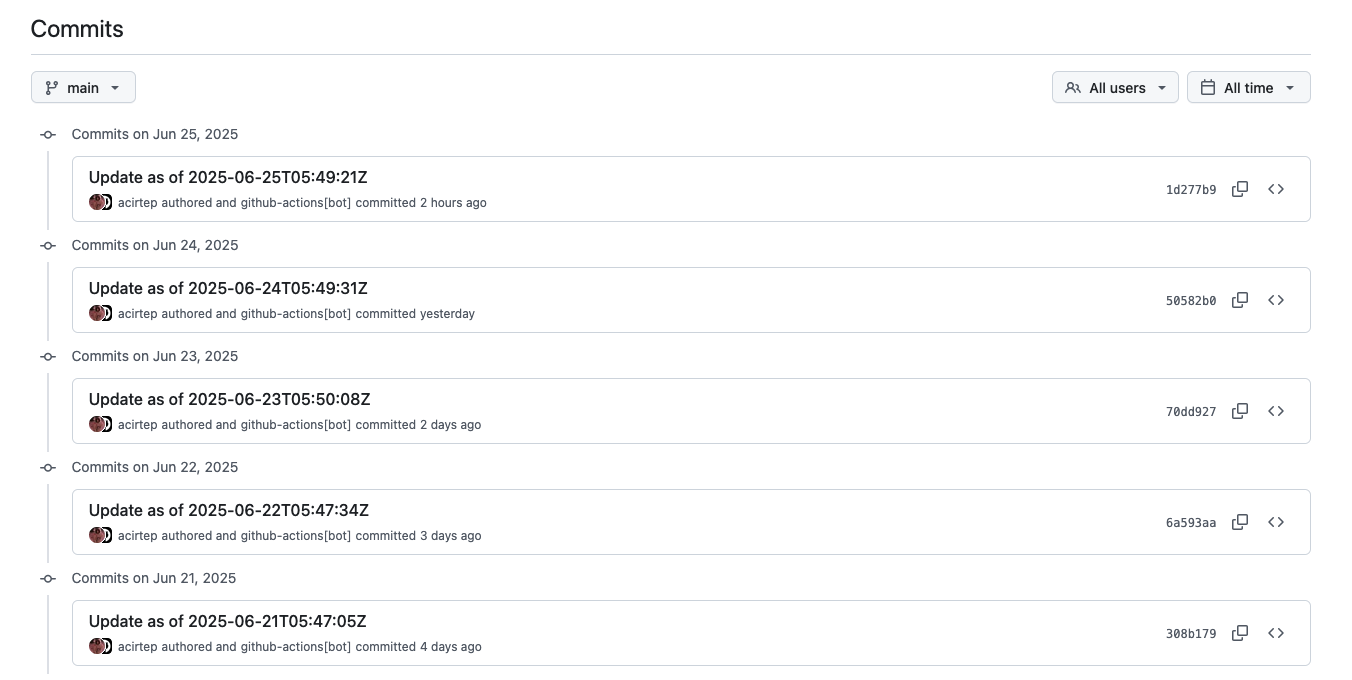
      - uses: stefanzweifel/git-auto-commit-action@v5        with:          commit_message: 'Update as of ${{ steps.datetime.outputs.datetime }}'          file_pattern: 'README.md'
With git-auto-commit-action we delegate to GitHub the right to create a commit with the updated README.md file:
Visualizing Historical Data
Because we store the search results into the README file and we update it daily with Git, we can retrieve the history of the search by getting the Git difference for each commit:
git-log: echo '|Name|Topics|Stars|Open Issues|Forks|Created At|Updated At|' > git_log.md && \ echo '|--|--|--|--|--|--|--|' >> git_log.md && \ git log --follow -p --pretty=format:"" -- README.md | grep '^+|\[' | sed 's/^+//' >> git_log.md && \ git diff -- README.md | grep '^+|\[' | sed 's/^+//' >> git_log.mdIn the above Makefile command we:
- create a file,
git_log.md, which has on the first line the header of the Markdown table; - add to
git_log.mdthe delimiter row; - for each commit, append to
git_log.mdthe new lines of the README differences; - append to
git_log.mdthe new lines from the current change of README.
The git_log.md contains now the entire history of appended records to the README file and it can be used to display a bubble chart with the repositories mentioning DuckDB:
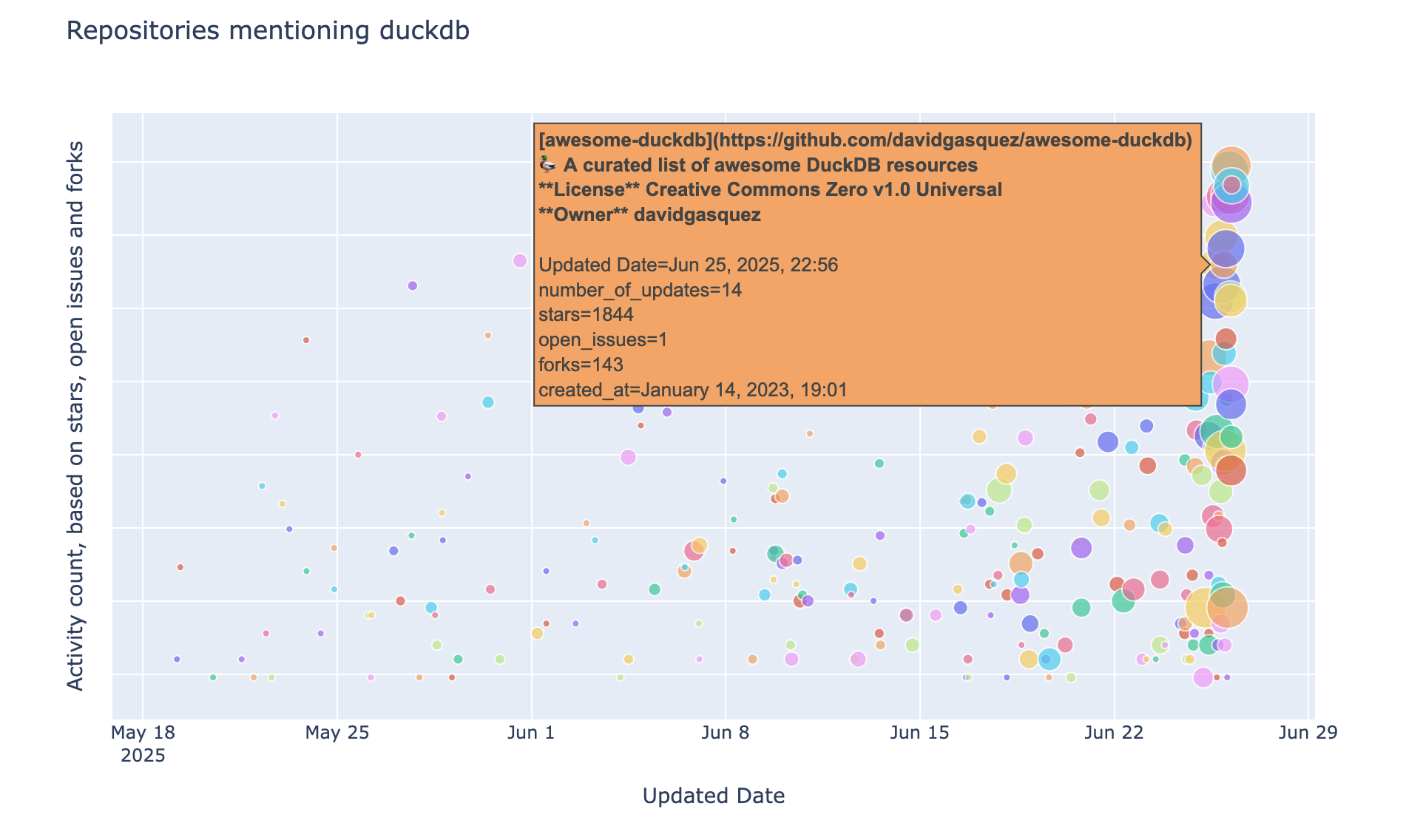
The above plot is generated with Plotly by providing as data source a DuckDB Python relation:
px.scatter( duckdb_conn.read_csv( "./git_log.md" skiprows=2 ) .select(""" #2 as repo, #3 as topics, #4 as stars, #5 as open_issues, #6 as forks, strftime(#7, '%B %d, %Y, %H:%m' ) as created_at, #8 as updated_at, if(stars + forks + open_issues = 0, 0, log(stars + forks + open_issues)) as log_activity_count, substr(repo, position('[' in repo) + 1 , position(']' in repo) - 2) as repo_name, count(distinct updated_at::date) over (partition by repo_name) as number_of_updates, row_number() over (partition by repo_name order by updated_at desc) as rn """) .filter("rn = 1") .order("updated_at"), x="updated_at", y="log_activity_count", labels={ "updated_at": "Updated Date", "log_activity_count": "Activity count, based on stars, open issues and forks" }, ...Using Markdown as a file format for our historical data might not be the best solution, because – among others – it does not support schema evolution. While we cannot do changes in the middle of the file (except column renames), we can remove the last column or add new ones at the end, due to the way DuckDB reads malformed CSV files.
Conclusion
In this post we showed how DuckDB can be used to process API requests and historical data from git commits. Some of the repositories returned by the GitHub search API made it to awesome-duckdb, which is our go-to list for curated DuckDB related projects; for example tailpipe, an open source Security Information and Event Management for instant log insights, and preswald, a Wasm packager for Python-based interactive data apps.