

2022-01-06
DuckDB Time Zones: Supporting Calendar Extensions
Richard Wesley
Time zone support is a common request for temporal analytics, but the rules are complex and somewhat arbitrary.
The most well supported library for locale-specific operations is the International Components for Unicode (ICU).
DuckDB already provided collated string comparisons using ICU via an extension (to avoid dependencies),
and we have now connected the existing ICU calendar and time zone functions to the main code
via the new TIMESTAMP WITH TIME ZONE (or TIMESTAMPTZ for short) data type. The ICU extension is pre-bundled in DuckDB’s Python client and can be optionally installed in the remaining clients.
In this post, we will describe how time works in DuckDB and what time zone functionality has been added.
What Is Time?
People assume that time is a strict progression of cause to effect, but actually from a non-linear, non-subjective viewpoint it’s more like a big ball of wibbly wobbly timey wimey stuff.
– Doctor Who: Blink
Time in databases can be very confusing because the way we talk about time is itself confusing. Local time, GMT, UTC, time zones, leap years, proleptic Gregorian calendars – it all looks like a big mess. But if you step back, modeling time is actually fairly simple, and can be reduced to two pieces: instants and binning.
Instants
You will often hear people (and documentation) say that database time is stored in UTC.
This is sort of right, but it is more accurate to say that databases store instants.
An instant is a point in universal time, and they are usually given as a count of some time increment from a fixed point in time (called the epoch).
In DuckDB, the fixed point is the Unix epoch 1970-01-01 00:00:00 +00:00, and the increment is microseconds (µs).
(Note that to avoid confusion we will be using ISO 8601 y-m-d notation in this post to denote instants.)
In other words, a TIMESTAMP column contains instants.
There are three other temporal types in SQL:
DATE– an integral count of days from a fixed date. In DuckDB, the fixed date is1970-01-01, again in UTC.TIME– a (positive) count of microseconds up to a single dayINTERVAL– a set of fields for counting time differences. In DuckDB, intervals count months, days and microseconds. (Months are not completely well-defined, but when present, they represent 30 days.)
None of these other temporal types except TIME can have a WITH TIME ZONE modifier (and shorter TZ suffix),
but to understand what that modifier means, we first need to talk about temporal binning.
Temporal Binning
Instants are pretty straightforward – they are just a number – but binning is the part that trips people up. Binning is probably a familiar idea if you have worked with continuous data: You break up a set of values into ranges and map each value to the range (or bin) that it falls into. Temporal binning is just doing this to instants:
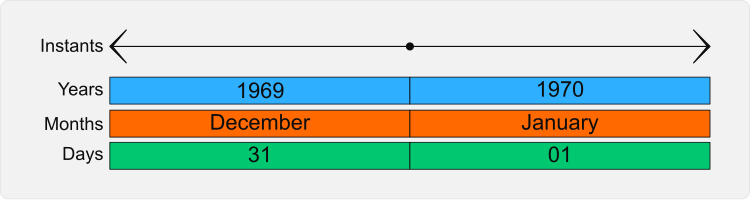
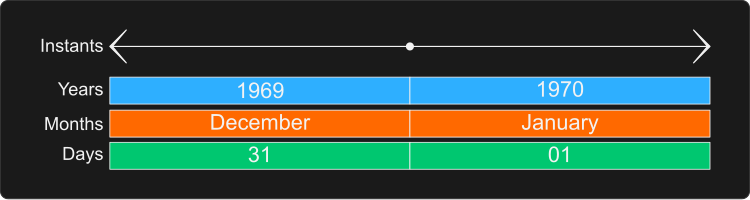
Temporal binning systems are often called calendars, but we are going to avoid that term for now because calendars are usually associated with dates, and temporal binning also includes rules for time. These time rules are called time zones, and they also impact where the day boundaries used by the calendar fall. For example, here is what the binning for a second time zone looks like at the epoch:
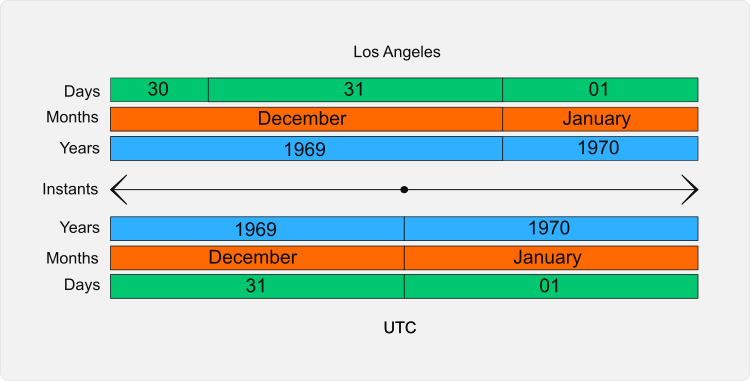
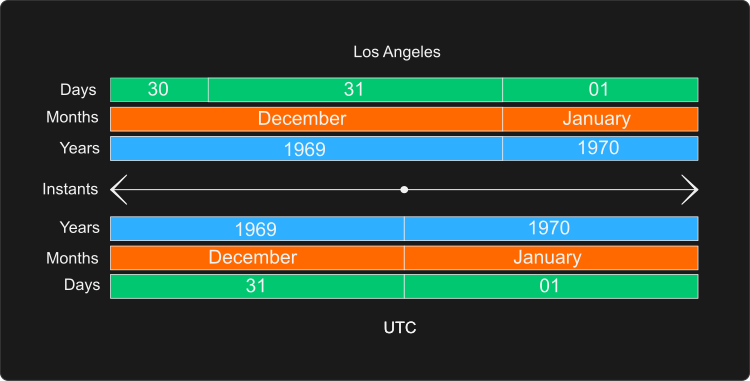
The most confusing thing about temporal binning is that there is more than one way to bin time, and it is not always obvious what binning should be used. For example, what I mean by “today” is a bin of instants often determined by where I live. Every instant that is part of my “today” goes in that bin. But notice that I qualified “today” with “where I live”, and that qualification determines what binning system is being used. But “today” could also be determined by “where the events happened”, which would require a different binning to be applied.
The biggest temporal binning problem most people run into occurs when daylight savings time changes. This example contains a daylight savings time change where the “hour” bin is two hours long! To distinguish the two hours, we needed to include another bin containing the offset from UTC:
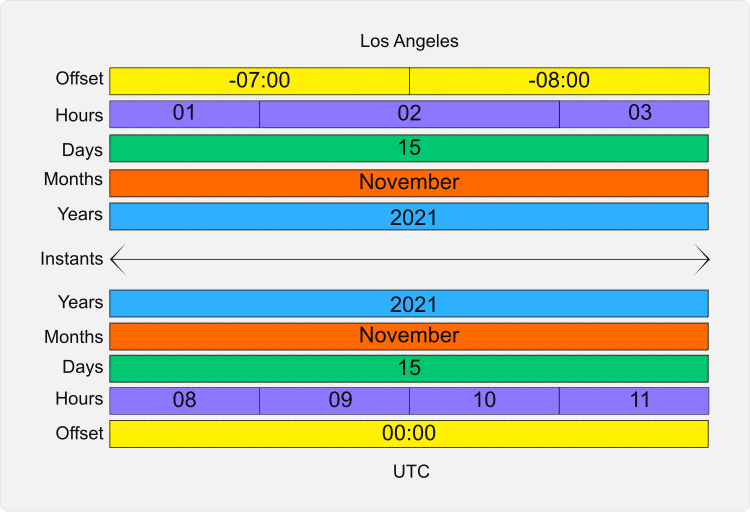
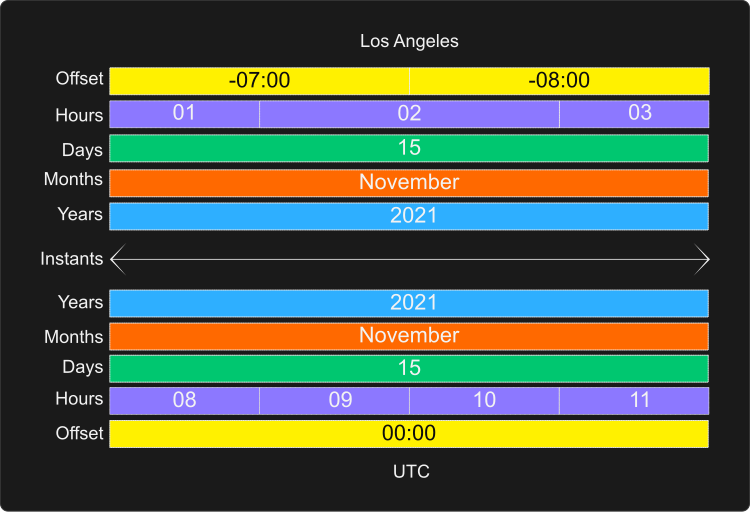
As this example shows, in order to bin the instants correctly, we need to know the binning rules that apply. It also shows that we can’t just use the built in binning operations, because they don’t understand daylight savings time.
Naïve Timestamps
Instants are sometimes created from a string format using a local binning system instead of an instant. This results in the instants being offset from UTC, which can cause problems with daylight savings time. These are called naïve timestamps, and they may constitute a data cleaning problem.
Cleaning naïve timestamps requires determining the offset for each timestamp and then updating the value to be an instant. For most values, this can be done with an inequality join against a table containing the correct offsets, but the ambiguous values may need to be fixed by hand. It may also be possible to correct the ambiguous values by assuming that they were inserted in order and looking for “backwards jumps” using window functions.
A simple way to avoid this situation going forward is to add the UTC offset to non-UTC strings: 2021-07-31 07:20:15 -07:00.
The DuckDB VARCHAR cast operation parses these offsets correctly and will generate the corresponding instant.
Time Zone Data Types
The SQL standard defines temporal data types qualified by WITH TIME ZONE.
This terminology is confusing because it seems to imply that the time zone will be stored with the value,
but what it really means is “bin this value using the session’s TimeZone setting”.
Thus a TIMESTAMPTZ column also stores instants,
but expresses a “hint” that it should use a specific binning system.
There are a number of operations that can be performed on instants without a binning system:
- Comparing;
- Sorting;
- Increment (µs) difference;
- Casting to and from regular
TIMESTAMPs.
These common operations have been implemented in the main DuckDB code base, while the binning operations have been delegated to extensions such as ICU.
One small difference between the display of the new WITH TIME ZONE types and the older types
is that the new types will be displayed with a +00 UTC offset.
This is simply to make the type differences visible in command line interfaces and for testing.
Properly formatting a TIMESTAMPTZ for display in a locale requires using a binning system.
ICU Temporal Binning
DuckDB already uses an ICU extension for collating strings for a particular locale, so it was natural to extend it to expose the ICU calendar and time zone functionality.
ICU Time Zones
The first step for supporting time zones is to add the TimeZone setting that should be applied.
DuckDB extensions can define and validate their own settings, and the ICU extension now does this:
-- Load the extension-- This is not needed in Python or R, as the extension is already installedLOAD icu;
-- Show the current time zone. The default is set to ICU's current time zone.SELECT * FROM duckdb_settings() WHERE name = 'TimeZone';
TimeZone Europe/Amsterdam The current time zone VARCHAR-- Choose a time zone.SET TimeZone = 'America/Los_Angeles';
-- Emulate Postgres' time zone tableSELECT name, abbrev, utc_offsetFROM pg_timezone_names()ORDER BY 1LIMIT 5;ACT ACT 09:30:00AET AET 10:00:00AGT AGT -03:00:00ART ART 02:00:00AST AST -09:00:00ICU Temporal Binning Functions
Databases like DuckDB and Postgres usually provide some temporal binning functions such as YEAR or DATE_PART.
These functions are part of a single binning system for the conventional (proleptic Gregorian) calendar and the UTC time zone.
Note that casting to a string is a binning operation because the text produced contains bin values.
Because timestamps that require custom binning have a different data type,
the ICU extension can define additional functions with bindings to TIMESTAMPTZ:
+– Add anINTERVALto a timestamp-– Subtract anINTERVALfrom a timestampAGE– Compute anINTERVALdescribing the months/days/microseconds between two timestamps (or one timestamp and the current instant).DATE_DIFF– Count part boundary crossings between two timestampDATE_PART– Extract a named timestamp part. This includes the part alias functions such asYEAR.DATE_SUB– Count the number of complete parts between two timestampDATE_TRUNC– Truncate a timestamp to the given precisionLAST_DAY– Returns the last day of the monthMAKE_TIMESTAMPTZ– Constructs aTIMESTAMPTZfrom parts, including an optional final time zone specifier.
We have not implemented these functions for TIMETZ because this type has limited utility,
but it would not be difficult to add in the future.
We have also not implemented string formatting/casting to VARCHAR
because the type casting system is not yet extensible,
and the current ICU build we are using does not embed this data.
ICU Calendar Support
ICU can also perform binning operations for some non-Gregorian calendars.
We have added support for these calendars via a Calendar setting and the icu_calendar_names table function:
LOAD icu;
-- Show the current calendar. The default is set to ICU's current locale.SELECT * FROM duckdb_settings() WHERE name = 'Calendar';
Calendar gregorian The current calendar VARCHAR-- List the available calendarsSELECT DISTINCT name FROM icu_calendar_names()ORDER BY 1 DESC LIMIT 5;rocpersianjapaneseiso8601islamic-umalqura-- Choose a calendarSET Calendar = 'japanese';
-- Extract the current Japanese era number using Tokyo timeSET TimeZone = 'Asia/Tokyo';
SELECT era('2019-05-01 00:00:00+10'::TIMESTAMPTZ), era('2019-05-01 00:00:00+09'::TIMESTAMPTZ);235 236Caveats
ICU has some differences in behavior and representation from the DuckDB implementation. These are hopefully minor issues that should only be of concern to serious time nerds.
- ICU represents instants as millisecond counts using a
DOUBLE. This makes it lose accuracy far from the epoch (e.g., around the first millennium) - ICU uses the Julian calendar for dates before the Gregorian change on
1582-10-15instead of the proleptic Gregorian calendar. This means that dates prior to the changeover will differ, although ICU will give the date as actually written at the time. - ICU computes ages by using part increments instead of using the length of the earlier month like DuckDB and Postgres.
Future Work
Temporal analysis is a large area, and while the ICU time zone support is a big step forward, there is still much that could be done. Some of these items are core DuckDB improvements that could benefit all temporal binning systems and some expose more ICU functionality. There is also the prospect for writing other custom binning systems via extensions.
DuckDB Features
Here are some general projects that all binning systems could benefit from:
- Add a
DATE_ROLLfunction that emulates the ICU calendarrolloperation for “rotating” around a containing bin; - Making casting operations extensible so extensions can add their own support;
ICU Functionality
ICU is a very rich library with a long pedigree, and there is much that could be done with the existing library:
- Create a more general
MAKE_TIMESTAPTZvariant that takes aSTRUCTwith the parts. This could be useful for some non-Gregorian calendars. - Extend the embedded data to contain locale temporal information (such as month names) and support formatting (
to_char) and parsing (to_timestamp) of local dates. One issue here is that the ICU date formatting language is more sophisticated than the Postgres language, so multiple functions might be required (e.g.,icu_to_char); - Extend the binning functions to take per-row calendar and time zone specifications to support row-level temporal analytics such as “what time of day did this happen”?
Separation of Concerns
Because the time zone data type is defined in the main code base, but the calendar operations are provided by an extension, it is now possible to write application-specific extensions with custom calendar and time zone support such as:
- Financial 4-4-5 calendars;
- ISO week-based years;
- Table-driven calendars;
- Astronomical calendars with leap seconds;
- Fun calendars, such as Shire Reckoning and French Republican!
Conclusion and Feedback
In this blog post, we described the new DuckDB time zone functionality as implemented via the ICU extension. We hope that the functionality provided can enable temporal analytic applications involving time zones. We also look forward to seeing any custom calendar extensions that our users dream up!
Last but not least, if you encounter any problems when using our integration, please open an issue in DuckDB’s issue tracker!